Login
Overview
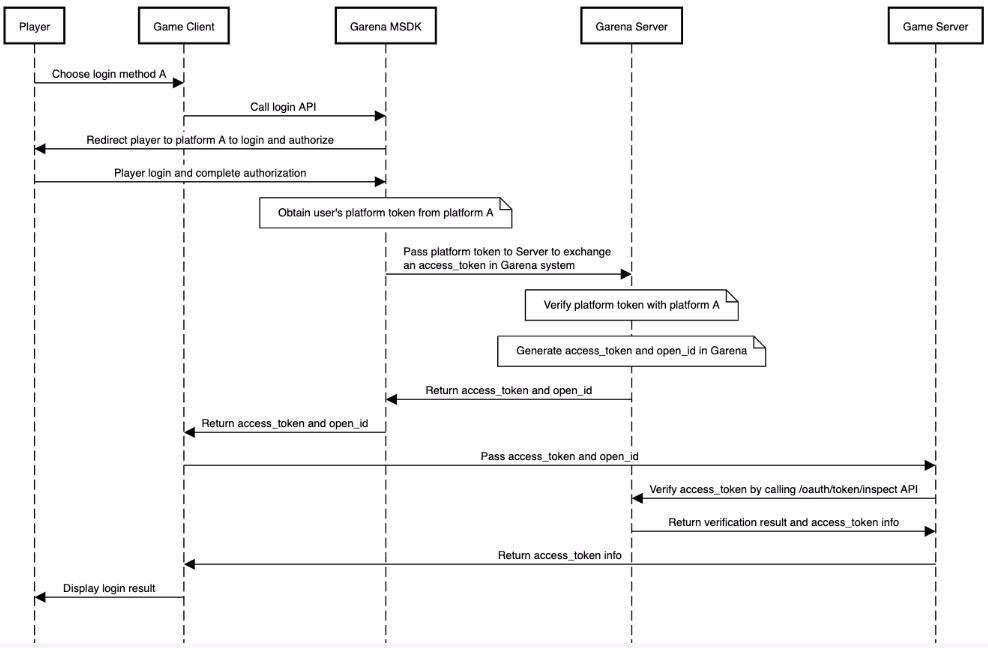
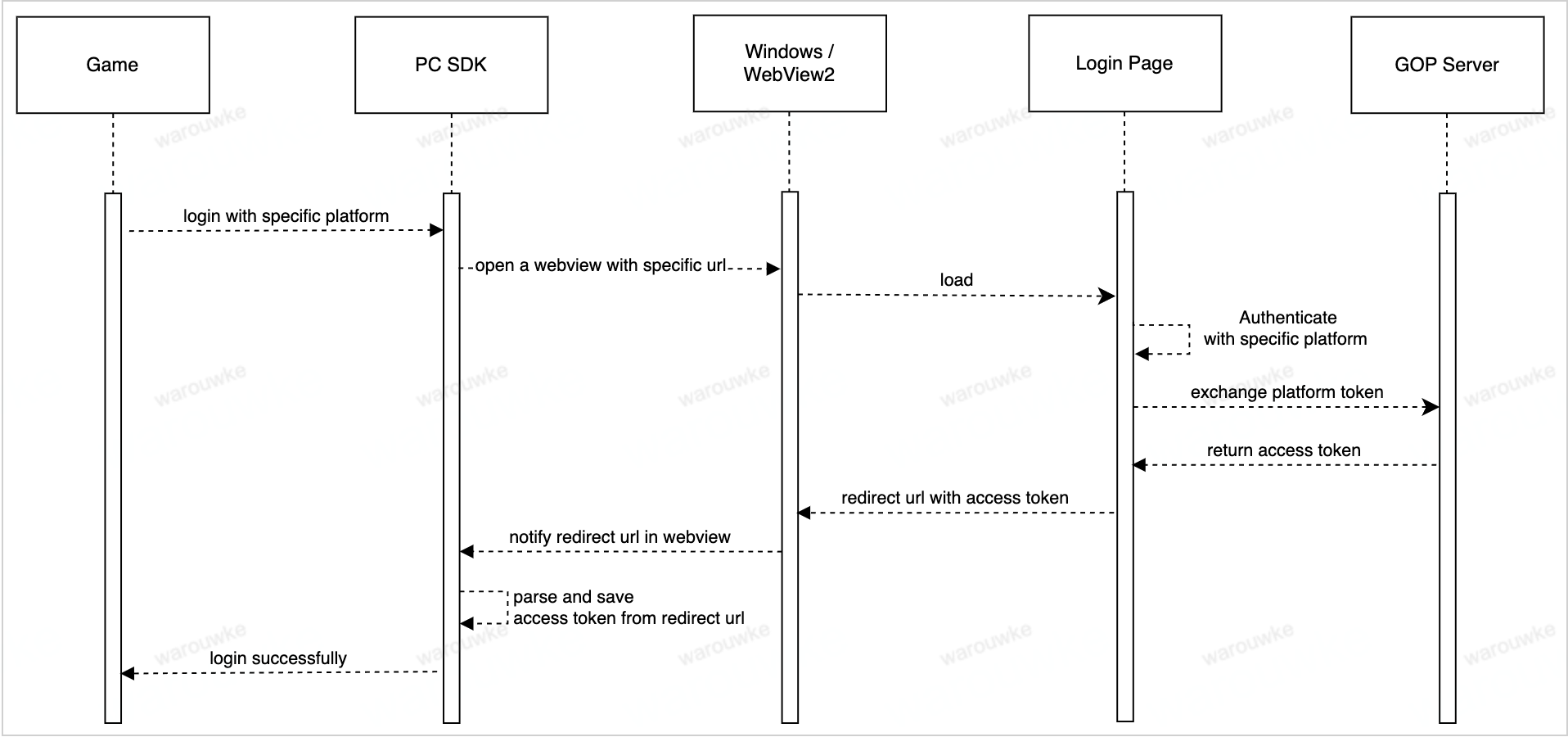
The whole login process looks like
- Mobile
- PC
Usage
Get the current login token
- Android
- iOS
- Unity
- Unreal
AccountManager.getLastLoginRecord();
Restore the status of the last login
- Android
- iOS
- Unity
- Unreal
AccountManager accountManager = new AccountManager(activity);
accountManager.restoreLogin(callback);
[MSDKLoginManager.shared restoreLoginWithCompletion:^(MSDKLoginRet * ret) {
    // handle login ret
}];
GMSDKHandler.LoginClient.RestoreLogin(OnLoginCallback);
UMsdkLogin::RestoreLogin();
Log out
- Android
- iOS
- Unity
- Unreal
AccountManager accountManager = new AccountManager(activity);
accountManager.logout(success -> {
            if (success) {
                ...
            } else {
                ...
            }
});
[MSDKLoginManager.shared logoutWithCompletion:^(MSDKCallbackFlag * _Nonnull flag) {
        // handle flag
}];
GMSDKHandler.LoginClient.LogoutWithCompletion(ret =>
    {
        if (ret.resultCode == ErrorCode.Success)
        {
            Debug.Log("Logout Success");
        }
        else
        {
            Debug.LogError("Logout Failed: " + ret.message);
        }
    });
void UMsdkLogin::LogoutWithCompletion()
FOnLogoutCompletion OnLogoutCompletion;
Log out directly regardless of whether the log-out API request is successful
- Android
- iOS
- Unity
- Unreal
AccountManager accountManager = new AccountManager(activity);
accountManager.logoutDirectly();
[MSDKLoginManager.shared logoutDirectly];
GMSDKHandler.LoginClient.LogoutDirectly();
void UMsdkLogin::LogoutDirectly()
Get server recommendation
Make sure you've configured your game server information on the Garena Open Platform.
- Android
- iOS
- Unity
- Unreal
LoginLocationManager.getRecommendedServer(activity, locale, result->{
    if(result.isSuccess()) {
        RecommendedServerInfo serverInfo = result.unwrap();
        String country = serverInfo.getCountry();
        Strint countryCode = serverInfo.getCountryCode();
        String recommendedServer = serverInfo.getRcommendedServer();
        ...
    } else {
        MSDKError error = result.getErrorInfo();
        // handle error
    }
});
[MSDKLoginLocationManager.shared requestServerRecommendationItemWithUserIP:input completion:^(MSDKServerRecommendationItem * _Nonnull item) {
      NSDictionary *item = @{@"recommendation": @{@"location": @{@"country_code": item.countryCode,
                                                               @"country": item.country},
                                                @"server_recommendation": item.serverRecommendation},
                           @"flag": [NSString stringWithFormat:@"%d", (int)item.flag]};
}];
public void GetServerRecommendation(string language, string country,
            Action<OnGetServerRecommendationResult> completion);
void UMsdkLogin::GetServerRecommendation(const FString& Language, const FString& Country)
Callback and Error Handling
- Android
- iOS
- Unity
- Unreal
You can listen to login status by OnLoginListener
    @Override
    public void onSessionStatusChanged(@NonNull LoginSessionStatus status, @Nullable MSDKError error) {
            if (LoginError.INVALID_TOKEN.equals(error)) {
                // current user token has expired, should go back to the login page and log in again.
                return;
            }
            if (status == LoginSessionStatus.OPENING) {
                // start login
                return;
            }

            if (AccountManager.isLogin()) {
                // do something
            }
        }
[MSDKLoginManager loginWithPlatform:MSDKePlatformGc completion:^(MSDKLoginRet *loginRet) {
		// handle login result
}];
Platform Info
Since v5.8.0.
- Android
- iOS
In order to provide more precise account info when dealing with App Platform Binding and Account Security Verifier, we’ve added new properties in the LoginToken.
loginPlatform:
Represents the platform used for logging into the account in the current login session. It is defined by the PlatformType enumeration. For example, if the user logs in with Garena, the value of this parameter would be Garena.
originalPlatform:
Indicates the original platform associated with the user’s account, representing the initial platform of the account when the user first played the game. In the scenario where a user swaps their Garena account to a Facebook account and subsequently logs in with the Facebook account, the value of originalPlatform would be Garena.
primaryPlatform:
Indicates the player’s current main active login account platform. If the login account is bound to a primary account on a specific platform, this parameter reflects the primary platform. Otherwise, it will have the same value as loginPlatform.
This field corresponds to the main_active_platform field on the server side.
For example, if a user logs in with a Garena account that is bound to a primary account on the Facebook platform, the value of this parameter would be Facebook.
The platformType has been deprecated.
In order to provide more precise account info when dealing with App Platform Binding and Account Security Verifier, we’ve added new properties in the MSDKLoginRet.
loginPlatform:
Represents the platform used for logging into the account in the current login session. It is defined by the MSDKePlatform enumeration. For example, if the user logs in with Garena, the value of this parameter would be Garena.
originalPlatform:
Indicates the original platform associated with the user’s account, representing the initial platform of the account when the user first played the game. In the scenario where a user swaps their Garena account to a Facebook account and subsequently logs in with the Facebook account, the value of originalPlatform would be Garena.
primaryPlatform:
Indicates the player’s current main active login account platform. If the login account is bound to a primary account on a specific platform, this parameter reflects the primary platform. Otherwise, it will have the same value as loginPlatform.
This field corresponds to the main_active_platform field on the server side.
For example, if a user logs in with a Garena account that is bound to a primary account on the Facebook platform, the value of this parameter would be Facebook.
The mainPlatform has been deprecated.