登录
概览
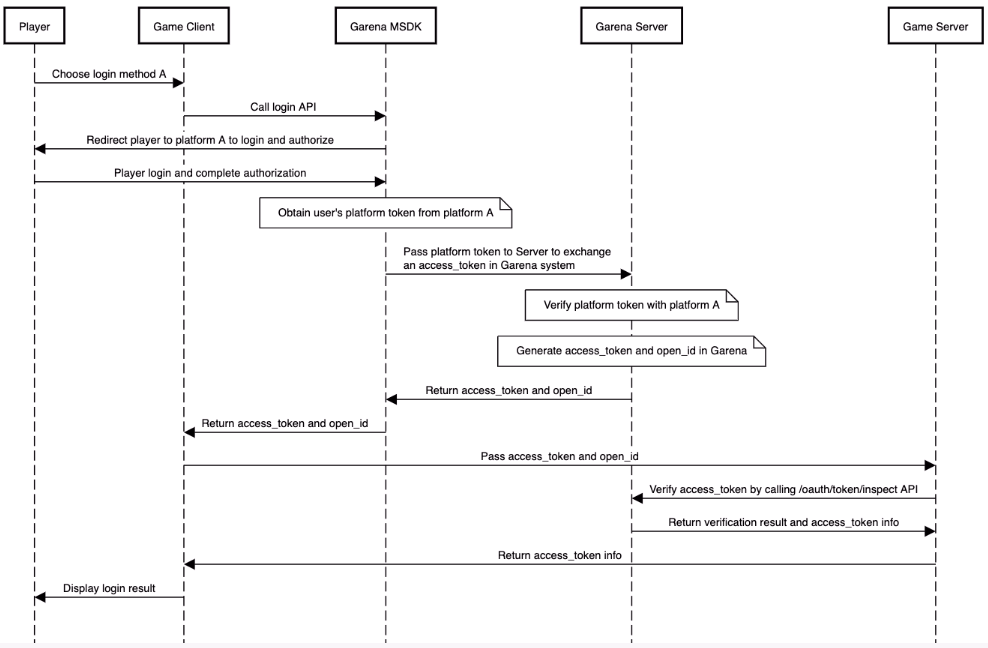
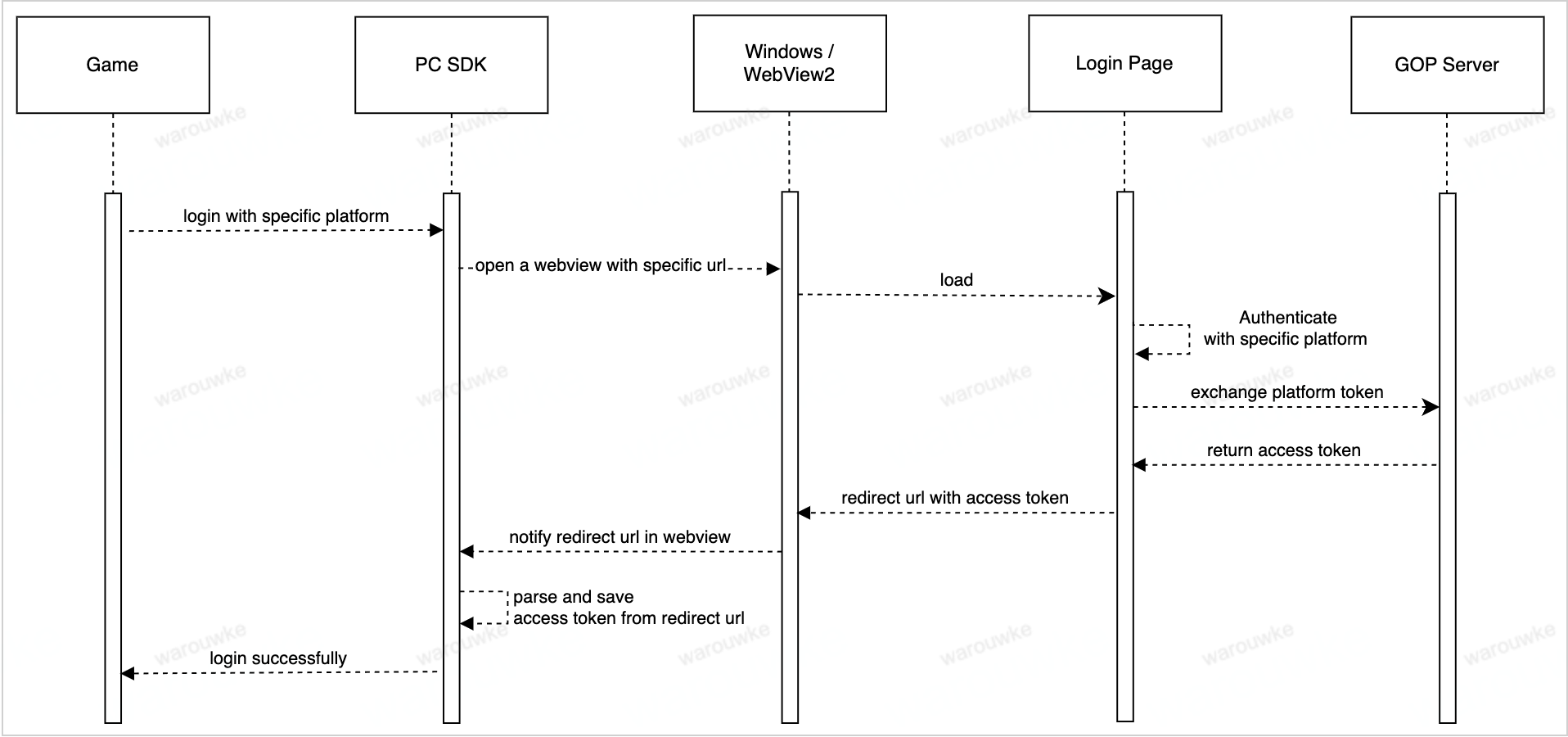
整个登录流程如下所示:
- Mobile
- PC
使用方法
获取当前的登录token
- Android
- iOS
- Unity
- Unreal
AccountManager.getLastLoginRecord();
恢复上次登录状态
- Android
- iOS
- Unity
- Unreal
AccountManager accountManager = new AccountManager(activity);
accountManager.restoreLogin(callback);
[MSDKLoginManager.shared restoreLoginWithCompletion:^(MSDKLoginRet * ret) {
    // handle login ret
}];
GMSDKHandler.LoginClient.RestoreLogin(OnLoginCallback);
UMsdkLogin::RestoreLogin();
退出登录
- Android
- iOS
- Unity
- Unreal
AccountManager accountManager = new AccountManager(activity);
accountManager.logout(success -> {
            if (success) {
                ...
            } else {
                ...
            }
});
[MSDKLoginManager.shared logoutWithCompletion:^(MSDKCallbackFlag * _Nonnull flag) {
        // handle flag
}];
GMSDKHandler.LoginClient.LogoutWithCompletion(ret =>
    {
        if (ret.resultCode == ErrorCode.Success)
        {
            Debug.Log("Logout Success");
        }
        else
        {
            Debug.LogError("Logout Failed: " + ret.message);
        }
    });
void UMsdkLogin::LogoutWithCompletion()
FOnLogoutCompletion OnLogoutCompletion;
直接退出登录,无论退出登录的API请求是否成功
- Android
- iOS
- Unity
- Unreal
AccountManager accountManager = new AccountManager(activity);
accountManager.logoutDirectly();
[MSDKLoginManager.shared logoutDirectly];
GMSDKHandler.LoginClient.LogoutDirectly();
void UMsdkLogin::LogoutDirectly()
获取推荐服务器
请确保在Garena开放平台已经预先配置好服务器相关配置
- Android
- iOS
- Unity
- Unreal
LoginLocationManager.getRecommendedServer(activity, locale, result->{
    if(result.isSuccess()) {
        RecommendedServerInfo serverInfo = result.unwrap();
        String country = serverInfo.getCountry();
        Strint countryCode = serverInfo.getCountryCode();
        String recommendedServer = serverInfo.getRcommendedServer();
        ...
    } else {
        MSDKError error = result.getErrorInfo();
        // handle error
    }
});
[MSDKLoginLocationManager.shared requestServerRecommendationItemWithUserIP:input completion:^(MSDKServerRecommendationItem * _Nonnull item) {
      NSDictionary *item = @{@"recommendation": @{@"location": @{@"country_code": item.countryCode,
                                                               @"country": item.country},
                                                @"server_recommendation": item.serverRecommendation},
                           @"flag": [NSString stringWithFormat:@"%d", (int)item.flag]};
}];
public void GetServerRecommendation(string language, string country,
            Action<OnGetServerRecommendationResult> completion);
void UMsdkLogin::GetServerRecommendation(const FString& Language, const FString& Country)
回调与错误处理
- Android
- iOS
- Unity
- Unreal
你可以通过 OnLoginListener 监听登录状态。
    @Override
    public void onSessionStatusChanged(@NonNull LoginSessionStatus status, @Nullable MSDKError error) {
            if (LoginError.INVALID_TOKEN.equals(error)) {
                // current user token has expired, should go back to the login page and log in again.
                return;
            }
            if (status == LoginSessionStatus.OPENING) {
                // start login
                return;
            }

            if (AccountManager.isLogin()) {
                // do something
            }
        }
[MSDKLoginManager loginWithPlatform:MSDKePlatformGc completion:^(MSDKLoginRet *loginRet) {
		// handle login result
}];
平台信息
自 v5.8.0 版本开始。
- Android
- iOS
为了在处理应用平台绑定和账户安全验证时提供更精确的账户信息,我们在LoginToken中添加了新的属性。
loginPlatform:
表示当前登录会话中用于登录账户的平台。它由PlatformType枚举定义。例如,如果用户使用 Garena 登录,该参数的值将为 Garena。
originalPlatform:
表示用户账户关联的原始平台,即用户首次玩游戏时的初始平台。在用户将 Garena 账户切换为 Facebook 账户并随后使用 Facebook 账户登录的情况下,originalPlatform 的值将为 Garena。
primaryPlatform:
表示用户当前的主要活跃登录账号平台。如果登录账户绑定到特定平台上的主要账户,该参数反映主要平台。否则,它将与loginPlatform的值相同。
该字段对应于服务端的main_active_platform字段。
例如,如果用户使用绑定到 Facebook 平台上的 Garena 账户登录,该参数的值将为 Facebook。
platformType 已弃用。
为了在处理应用平台绑定和账户安全验证时提供更精确的账户信息,我们在MSDKLoginRet中添加了新的属性。
loginPlatform:
表示当前登录会话中用于登录账户的平台。它由MSDKePlatform枚举定义。例如,如果用户使用 Garena 登录,该参数的值将为 Garena。
originalPlatform:
表示用户账户关联的原始平台,即用户首次玩游戏时的初始平台。在用户将 Garena 账户切换为 Facebook 账户并随后使用 Facebook 账户登录的情况下,originalPlatform 的值将为 Garena。
primaryPlatform:
表示用户当前的主要活跃登录账号平台。如果登录账户绑定到特定平台上的主要账户,该参数反映主要平台。否则,它将与loginPlatform的值相同。
该字段对应于服务端的main_active_platform字段。
例如,如果用户使用绑定到 Facebook 平台上的 Garena 账户登录,该参数的值将为 Facebook。
mainPlatform 已弃用。