应用内支付
概述
在开始接入之前,请确保您已经完成了开始教程。
配置
MSDK提供多种支付渠道模块。
- Android
- iOS
- Unity
- Unreal
您可以根据需求选择谷歌或华为支付渠道。
- Google Play
- Huawei
配置依赖
在app级别下的build.gradle中添加以下依赖,并将$msdk_version替换为实际的MSDK版本
implementation "com.garena.sdk.android:payment-google:$msdk_version"
配置清单文件
请确认在AndroidManifest.xml文件中已经声明applicationId
<meta-data
   android:name="com.garena.sdk.applicationId"
   android:value="YourAppId" />
配置依赖
- 在项目级别的
build.gradle中添加以下内容
buildscript {
  // 配置华为 maven 仓库 URL
  repositories {
    maven { url "https://developer.huawei.com/repo/" }
  }

  // 导入华为 gradle 插件
  dependencies {
    classpath 'com.huawei.agconnect:agcp:1.6.2.300'
  }
}
- 在应用级别的
build.gradle中应用华为插件
apply plugin: 'com.huawei.agconnect'
- 在应用级别的
build.gradle中导入华为模块,并将$msdk_version替换为实际的 MSDK 版本。
implementation "com.garena.sdk.android:payment-huawei:$msdk_version"
配置清单文件
在应用的AndroidManifest.xml文件中声明华为cpid
<meta-data
android:name="com.huawei.hms.client.cpid"
android:value="cpid=[huawei_cpid]" />
配置文件
将 agconnect-services.json 文件放入您的应用模块中。更多详情
Apple App Store是主要的支付渠道。
在进行任何购买之前,请首先注册您的付款以启用更新监听器。如果您的应用程序有未完成的交易,监听器将接收到它们一次。如果没有任务来监听这些交易,您的应用程序可能会错过它们。
我们建议您在登录后立即调用此功能,因为需要会话来注册付款。
[MSDKPaymentManager.shared registerPay];
UMsdkPaymentiOS::RegisterPay();
核心购买流程
获取所有支付商品
获取所有支付商品的列表,包括促销商品、返利商品和应用商品。
- Android
- iOS
- Unity
- Unreal
默认条件下MSDK只返回不包含月卡的商品列表。如果你之前已经获取到有效的月卡ID,并且想要只获取该月卡的商品信息,可以调用builder.setRebateId(id)传入月卡id。
此外,可以通过builder.setRebateId(PaymentManager.ALL_ITEMS)获取所有的商品(包含月卡和非月卡商品),然后自己根据需要过滤商品列表。
    PaymentInfoRequestParams.Builder paramsBuilder = new PaymentInfoRequestParams.Builder();

    paramsBuilder.setLocalizeProductPrice(true or false);
    paramsBuilder.setRebateId(PaymentManager.NON_REBATE_ITEMS);

    PaymentManager.getChannelList(this, paramsBuilder.build(), result -> {
        // handle channel list result
        if(result.isSuccess()) {
         PaymentChannelInfo info = result.unwrap();
         LocalizeResult localizeResult = info.getLocalizeResult();
            List<PaymentChannel> channels = info.getChannels(); // by right, this should be a list of length 1

            if(channels.size() >= 1) {
             PaymentChannel channel = channels.get(0);

             List<Denomination> items = channel.getItems();

                // render your UI with the items
            } else {
                // this won't happen
            }

        } else {
         MSDKError error = result.getErrorInfo();
         // handle error
        }
    });
[MSDKPaymentManager.shared setProductPrefixForIAPQuery:prefix]; // Apple product item prefix
[MSDKPaymentManager.shared loadPaymentOptionsWithRoleID:0
                                               serverID:0
                                                 locale:appLocale // current device locale
                                          localizeProductPrice:true
                                                  items:itemIDs // item IDs for filtering
                                                rebates:rebateIDs // rebateIDs for filtering
                                               appItems:appItemIDs // appItemIDs for filtering
                                             completion:^(MSDKPaymentOptionInfo * paymentOptionInfo) {
    NSLog(@"%@", paymentOptionInfo);
}];
注意: 当 localizeProductPrice 为 true 时,你必须使用有效的前缀调用 setProductPrefixForIAPQuery API,以启用产品价格的本地化。
var loadIAPItemsParams = new LoadIAPItemsParams
{
    ServerId = SERVER_ID,
    RoleId = ROLE_ID,
    RebateFlag = RebateFlag.AllItems,
    ItemIds = !string.IsNullOrEmpty(_itemIds) ? _itemIds.Split(',') : null,
    RebateIds = !string.IsNullOrEmpty(_rebateIds) ? _rebateIds.Split(',') : null,
    AppItemIds = !string.IsNullOrEmpty(_appItemIds) ? _appItemIds.Split(',') : null,
    Locale = _locale,
    iosProductPrefix = PRODUCT_PREFIX
};

GMSDKHandler.PaymentClient.LoadIAPItems(loadIAPItemsParams, result => { LogScene.LogResult(result); });
iOS
void UMsdkPaymentiOS::LoadPaymentOptions(int RoleID, int ServerID, FString Locale, bool LocalizeProductPrice, TArray<int> Items, TArray<int> Rebates, TArray<int> AppItems);
Android
void UMsdkPayment::LoadPaymentOptionsWithIds(int32 ServerId, int32 RoleId, bool LocalizedPrice,
                                             TArray<int32> ItemIds, TArray<int32> RebateIds)
获取应用商品
获取有效的应用商品信息。游戏客户端应使用此信息来向用户显示相应的有效应用商品。
- Android
- iOS
- Unity
- Unreal
    PaymentManager.getAppItems(this, serverId, roleId, locale, itemIds, result ->{
        if(result.isSuccess()) {
            List<AppItem> appItems = result.unwrap();
            // render your UI
        } else {
            MSDKError err = result.getErrorInfo();
        }
    });
[MSDKPaymentManager.shared getAppItemOptionsWithRoleID:0
                                              serverID:0
                                                locale:[BTUserSettings sharedInstance].appLocale
                                              appItems:inputAppItemIDs
                                            completion:^(MSDKAppItemOptionsRet *ret) {
    if (ret.flag == MSDKeFlagSucc) {
        for (MSDKAppItemOptionItem *it in ret.items) {
            NSDictionary *data = @{@"id"          : @(it.appItemId),
                                   @"name"        : it.name,
                                   @"description" : it.appItemDescription,
                                   @"icon"        : it.icon
                                   };
            NSLog(@"App Item: %@", data);
        }
    }
}];
var appItems =
    string.IsNullOrEmpty(_appItemOptionsAppItemIds)
        ? Array.Empty<string>()
        : _appItemOptionsAppItemIds.Split(',');
var getAppItemsParams = new LoadAppItemsParams
{
    AppItemIds = appItems,
    Locale = _locale,
};
GMSDKHandler.PaymentClient.LoadAppItems(getAppItemsParams, LogScene.LogResult);
void UMsdkPaymentiOS::GetAppItemOptions(int RoleID, int ServerID, FString Locale, TArray<int> AppItems)
进行支付
在获取支付选项后,您可以使用以下代码发起支付请求。支付请求将触发平台的原生支付流程。
在充值和兑换成功时,请勿在MSDK回调API中使用point_amount。如果您直接使用此字段在游戏中添加现金余额,这样是不安全的。
请调用GOP服务器端的API(/app/point/get_balance),以便在MSDK回调API返回成功结果后获取新的现金余额。
- Android
- iOS
- Unity
- Unreal
    // create params with the selected denomination. You should have retrieved the denomination list by step b.1
    PurchaseRequestParams purchaseRequestParams = new PurchaseRequestParams.Builder(itemId).build();

    // pass the request params to SDK
    PaymentManager.purchase(this /* activity instance */, purchaseRequestParams, (result, extra) -> {
        if (result.isSuccess()) {
            TransactionInfo transaction = result.unwrap();

        } else {
            MSDKError error = result.getErrorInfo();
            // handle error

            // since v5.9, we can obtain the exact payment step that the failure occurs
            int paymentStep = extra.getPaymentStep();

            if(paymentStep < PaymentStep.RECEIVE_RESULTS) {
                // the error occurs before google returning the payment results to us.
            }
        }
        PaymentEligibility paymentEligibility = extra.getPaymentEligibility();
        // paymentEligibility can be null, so we MUST do a null check
        if(paymentEligibility != null) {
         // handle eligibility info
        }
    });
MSDKPaymentRequestParameters *params = [[MSDKPaymentRequestParameters alloc] initWithProductID:@"com.game.fishfood.1000" roleID:0 serverID:0 topupLimit:-1 region:nil gameData:@"data:abc"];

[MSDKPaymentManager.shared payWithParam:params completion:^(MSDKPaymentPayRet * _Nonnull ret) {
    if (ret.flag == MSDKeFlagSucc) {
        NSLog(@"payment made and committed to GOP Server successfully");
    } else {
        NSLog(@"Error code: %ld", ret.flag);
        if (ret.extInfo.paymentStep == MSDKPaymentStepCommit) {
            NSLog(@"payment made successfully but failed to commit to GOP Server");
        } else if (ret.extInfo.paymentStep == MSDKPaymentStepConsume) {
           NSLog(@"exception happens. MSDKPaymentStepConsume normally comes with MSDKeFlagSucc");
        } else {
            NSLog(@"failed to make Apple IAP payment");
        }
   }
}];
var purchaseParams = new PurchaseParams
{
    ServerId = SERVER_ID,
    RoleId = ROLE_ID,
    ProductIdentifier = PRODUCT_PREFIX + _productId,
    TopupLimit = topupLimit,
    Region = _region,
    ItemId = _productId,
    GameData = _gameData,
};
GMSDKHandler.PaymentClient.PurchaseProduct(purchaseParams, LogScene.LogResult);
回调
GMSDKHandler.PaymentClient.SetOnDistributeGoodsFailureCallback(OnDistributeGoodsFailure);
GMSDKHandler.PaymentClient.SetOnDistributeGoodsFinishCallback(OnDistributeGoodsFinish);
iOS
void UMsdkPaymentiOS::Pay(const FPaymentRequestParameters &Param);
Android
void UMsdkPayment::Purchase(int32 ServerId, int32 RoleId, FString ItemId, const FString Region,
                            int32 TopupLimit, const FString GameData)
回调
FOnIAPPayFinish OnIAPPayFinish;

FOnIAPPayFailure OnIAPPayFailure;

FOnDistributeGoodsFinish OnDistributeGoodsFinish;

FOnDistributeGoodsFailure OnDistributeGoodsFailure;
处理待处理/未完成的交易
在某些情况下,用户的购买可能会被中断或由于网络问题、服务器错误或其他问题而无法完成。为了确保用户收到他们购买的物品并保持良好的用户体验,MSDK提供了处理这些待处理或未完成交易的方法。
您应该在以下情况下调用这些方法:
- 用户成功登录后
- 收到支付失败回调时
- 收到商品分发失败回调时
这有助于确保任何待处理的交易都能得到正确处理,用户能够收到他们购买的物品。
- Android
- iOS
- Unity
- Unreal
用户的存货中可能包括用户在Google Play使用兑换码获得的商品,或者是之前用户支付成功,但是因为网络原因没能成功发货的订单。可以通过PurchasedItemInfo.isPromotion()来区分。
// replace PaymentInfoRequestParams with serverId and roleId
PaymentManager.scanPurchaseInventory(this /* activity instance */, serverId, roleId, result -> {

});
[MSDKPaymentManager.shared iapRestoreFailureDistributeGoodsWithRoleID:0 serverID:0 completion:^(MSDKPaymentDistributeGoodsRet * _Nonnull ret) {
    if (ret.flag == MSDKeFlagSucc) {
        NSLog(@"the request executed succesully");
        for (MSDKPaymentRestoredRequestInfo *info in ret.restoredFailureRequestInfos) {
            if (info.flag == MSDKeFlagSucc) {
                NSLog(@"transaction %@ commited to GOP server successfully", info.requestInfo);
            } else {
                NSLog(@"transaction %@ failed to commit to GOP server", info.requestInfo);
            }
        }
    } else {
        NSLog(@"the request failed for some reason");
    }
}];
观察计费问题
仅适用于 iOS 16+
每次您的应用程序启动时,StoreKit 都会检索来自App Store的任何消息,并默认呈现这些消息。
通过调用registerBillingIssueMessage(),MSDK 将抑制这些消息,以便您可以在适当的时候使用displayBillingIssueMessages(scene:)调用它们。
例如,您可以选择在视图中延迟消息,在其中,中断式的消息可能会使用户困惑,比如在引导流程的中间,或者如果您的应用程序正在提供实时说明。
在调用registerBillingIssueMessage()后,MSDK将通过委托didReceiveStoreKitMessage(reason: Int, description: String)告知您当他们收到一条消息。
StoreKit 消息将出现在诸如订阅项目提高价格、自动续订订阅遇到问题等情况下。
管理订阅
仅适用于 iOS 15+
调用showManageSubscriptionsWithScene: completionHandler:来显示一个页面来管理用户的订阅。阅读更多信息
GMSDKHandler.PaymentClient.CommitPendingTransactions(SERVER_ID, ROLE_ID, ret =>
{
    LogScene.LogResult(ret);
    if (ret.resultCode == ErrorCode.Success && ret.data != null)
    {
        Debug.Log("succeedPurchases: " + JsonUtility.ToJson(ret.data.succeedPurchases));
        Debug.Log("failedPurchases: " + JsonUtility.ToJson(ret.data.failedPurchases));
    }
    }
    else
    {
        Debug.LogError("ScanIAPInventory Failed: " + ret.Description + "," + ret.message);
    }
});
iOS
void UMsdkPaymentiOS::IapRestoreFailureDistributeGoods(int RoleID, int ServerID)
Android
    UFUNCTION(BlueprintCallable, meta = (DisplayName = "ScanPurchaseInventory", Keywords = "MsdkPaymentAndroid"),
        Category = "MsdkPaymentAndroid")
    static void ScanPurchaseInventory(int32 ServerId, int32 RoleId);
返利卡购买
返利卡允许用户以优惠价格购买物品。当用户购买返利卡时,他们可以在指定时间内使用它来获得未来购买的折扣。折扣金额和有效期因返利卡而异。
在向用户展示返利卡之前,您需要使用下面的API获取当前有效的返利选项。请确保在每次购买后刷新列表,因为返利卡的有效性可能会发生变化。
获取返利卡
永远不要缓存返回的数据,该数据会随着时间动态改变。
- Android
- iOS
- Unity
- Unreal
    PaymentManager.getRebateOptions(this, serverId, roleId, locale, rebateIds, result -> {
                if (result.isSuccess()) {
                    List<RebateOptionItem> rebateOptions = result.unwrap();
                    // render the rebate card UI
                } else {
                    MSDKError err = result.getErrorInfo();
                }
            });
[MSDKPaymentManager.shared getRebateOptionsWithRoleID:0
                                             serverID:0
                                             locale:nil
                                             rebates:rebateIDs // rebate card IDs for filtering. If this value is provided, the result will only contain information related to these rebate cards.
                                             completion:^(MSDKRebateOptionsRet *ret) {
    NSLog(@"getRebateOptions completion");
    if (ret.flag == MSDKeFlagSucc) {
      for (MSDKRebateOptionItem *it in ret.items) {
          NSDictionary *data = @{@"description"       : it.rebateCardDescription,
                                 @"id"                : @(it.rebateId),
                                 @"name"              : it.name,
                                 @"owned"             : @(it.isOwned),
                                 @"rebate_amount"     : @(it.rebateAmount),
                                 @"rebate_days"       : @(it.rebateDays),
                                 @"remaining_days"    : @(it.remainingDays),
                                 @"valid_to_purchase" : @(it.isValidToPurchase),
                                 @"valid_to_redeem"   : @(it.isValidToRedeem),
                                 };
          NSLog(@"rebate card item: %@", data)
      }
    }
}];
var getRebateOptionsParams = new LoadRebateOptionsParams()
{
    RebateIds = !string.IsNullOrEmpty(_rebateOptionsRebateIds) ? _rebateOptionsRebateIds.Split(',') : null,
    Locale = _locale,
};
GMSDKHandler.PaymentClient.LoadRebateOptions(getRebateOptionsParams, LogScene.LogResult);
进行支付
在获取返利选项后,您可以发起支付流程来购买返利物品。该过程与常规应用内购买类似,但需要额外的返利ID参数。
当购买成功时,您将收到包含交易详细信息的回调。
- Android
- iOS
- Unity
- Unreal
    // create params with the selected denomination
    PurchaseRequestParams.Builder builder = new PurchaseRequestParams.Builder(itemId);
    /* setup builder params*/
    builder.setRebateId(rebateId);

    // pass the request params to SDK
    PaymentManager.purchase(this /* activity instance */, builder.build(), result -> {
        if (result.isSuccess()) {
            TransactionInfo transaction = result.unwrap();

        } else {
            MSDKError error = result.getErrorInfo();
            // handle error
        }
    });
MSDKPaymentRequestParameters *params = [[MSDKPaymentRequestParameters alloc] initWithProductID:@"com.game.fishfood.1000" roleID:0 serverID:0 topupLimit:-1 region:nil gameData:@"data:abc"];

[MSDKPaymentManager.shared payWithParam:params completion:^(MSDKPaymentPayRet * _Nonnull ret) {
    if (ret.flag == MSDKeFlagSucc) {
        NSLog(@"payment made and committed to GOP Server successfully");
    } else {
        NSLog(@"Error code: %ld", ret.flag);
        if (ret.extInfo.paymentStep == MSDKPaymentStepCommit) {
            NSLog(@"payment made successfully but failed to commit to GOP Server");
        } else if (ret.extInfo.paymentStep == MSDKPaymentStepConsume) {
           NSLog(@"exception happens. MSDKPaymentStepConsume normally comes with MSDKeFlagSucc");
        } else {
            NSLog(@"failed to make Apple IAP payment");
        }
    }
   });
}];
var purchaseParams = new PurchaseParams
{
    ServerId = SERVER_ID,
    RoleId = ROLE_ID,
    ProductIdentifier = PRODUCT_PREFIX + _productId,
    TopupLimit = topupLimit,
    Region = _region,
    ItemId = _productId,
    GameData = _gameData,
};
GMSDKHandler.PaymentClient.PurchaseProduct(purchaseParams, LogScene.LogResult);
回调
GMSDKHandler.PaymentClient.SetOnDistributeGoodsFailureCallback(OnDistributeGoodsFailure);
GMSDKHandler.PaymentClient.SetOnDistributeGoodsFinishCallback(OnDistributeGoodsFinish);
iOS
void UMsdkPaymentiOS::Pay(const FPaymentRequestParameters &Param)

DECLARE_DYNAMIC_MULTICAST_DELEGATE_OneParam(FOnIAPPayCompletion, const FMsdkPaymentPayRet&, Ret);
FOnIAPPayCompletion OnIAPPayCompletion;
Android
void UMsdkPayment::Purchase(int32 ServerId, int32 RoleId, FString ItemId, const FString Region,
                            int32 TopupLimit, const FString GameData)
回调
FOnIAPPayFinish OnIAPPayFinish;

FOnIAPPayFailure OnIAPPayFailure;

FOnDistributeGoodsFinish OnDistributeGoodsFinish;

FOnDistributeGoodsFailure OnDistributeGoodsFailure;

FOnRebatePurchaseNotify OnRebatePurchaseNotify;
兑换返利卡
兑换功能允许用户领取他们的返利卡。您可以使用ID兑换特定的返利卡,也可以一次性兑换所有可用的返利卡。
请考虑以下情况:
- 如果兑换返利卡在GOP服务器上请求成功,但MSDK没有收到响应(例如由于网络错误),立即连续尝试调用兑换返利卡将返回错误。如果遇到这种情况,建议游戏服务器查询最新余额,其中将包括以前的兑换。
- 对于成功兑换时的完成回调,请调用GOP服务器API以获取最新余额,而不是使用回调返回的兑换金额进行手动余额计算。
兑换所有返利卡
- Android
- iOS
- Unity
- Unreal
    PaymentManager.redeemAll(this, serverId, roleId, result-> {
     // handle result
    });
[MSDKPaymentManager.shared redeemWithRoleID:0 serverID:0 completion:^(MSDKRedeemRet *ret) {
    NSLog(@"redeemAll completion");
}];
GMSDKHandler.PaymentClient.RedeemAll(SERVER_ID, ROLE_ID, LogScene.LogResult);
兑换特定返利卡
- Android
- iOS
- Unity
- Unreal
    PaymentManager.redeem(this, rebateId, serverId, roleId, result -> {
        if (result.isSuccess()) {
            RedeemInfo redeemInfo = result.unwrap();

        } else {
            MSDKError err = result.getErrorInfo();
        }
    });
[MSDKPaymentManager.shared redeemWithRoleID:0 serverID:0 rebateID: rebateCardID completion:^(MSDKRedeemRet *ret) {
    NSLog(@"redeemPurchaseCardID %@ completion", rebateCardID);
}];
GMSDKHandler.PaymentClient.RedeemRebateOption(SERVER_ID, ROLE_ID, rebateId, LogScene.LogResult);
T-rex活动购买
获取活动配置
获取指定地区的活动信息列表.
- Android
- iOS
- Unity
- Unreal
    PaymentManager.loadEventConfigs(this /* activity instance*/, region, true, result->{
        if(result.isSuccess()) {

        } else {

        }
    });
[MSDKPaymentManager.shared loadEventsWithRegion:region
                                   isActiveOnly:true // Specify whether only active events will be returned in the completion callback
                                   completion:^(MSDKEventsRet *ret) {
    if (ret.flag == MSDKeFlagSucc) {
        for (MSDKEvent *event in ret.events) {

            NSLog(@"eventInfo eventID: %@", event.eventID);
            NSLog(@"eventInfo region: %@", event.region);
            NSLog(@"eventInfo type: %@", event.type);
            NSLog(@"eventInfo startTime: %@", event.startTime");
            NSLog(@"eventInfo endTime: %@", event.endTime);

            NSMutableArray *eventConfigs = [[NSMutableArray alloc] init];
            for (MSDKEventConfig *eventConfig in event.eventConfigs) {
                NSLog(@"eventConfigInfo priceAmt: %@", eventConfig.price);
                NSLog(@"eventConfigInfo itemID: %@", eventConfig.itemID);
                NSLog(@"eventConfigInfo rebateCardID: %@", eventConfig.rebateID);
                NSLog(@"eventConfigInfo extraInfo: %@", eventConfig.extraInfo);
            }
        }
    }
}];
GMSDKHandler.PaymentClient.LoadEventConfigs(_region, true, LogScene.LogResult);
void UMsdkPaymentiOS::LoadEvents(FString Region, bool bIsActiveOnly)
获取活动配置商品
获取指定地区活动的所有支付商品,包括促销商品、返利商品和应用商品.
- Android
- iOS
- Unity
- Unreal
    PurchaseRequestParams.Builder builder = new PurchaseRequestParams.Builder(itemId, eventId);
    /* setup builder params*/

    PaymentManager.getEventsPricing(this, params, result -> {

    }
[MSDKPaymentManager.shared setProductPrefixForIAPQuery:prefix]; // Apple product item prefix
[MSDKPaymentManager.shared loadEventItemsWithRoleID:0
                      serverID:0
                                           region:region
                                           localizeProductPrice:true
                                           completion:^(MSDKEventPaymentOptionInfo *ret) {
  if (ret.flag == MSDKeFlagSucc) {
        NSLog(@"Event Payment Option Info: %@", ret);
    }
}];
var loadEventIAPItemsParams = new LoadEventIAPItemsParams
{
    ServerId = SERVER_ID,
    RoleId = ROLE_ID,
    Region = _region,
    Locale = _locale
};
GMSDKHandler.PaymentClient.LoadEventIAPItems(loadEventIAPItemsParams, LogScene.LogResult);
void UMsdkPaymentiOS::LoadEventItems(int RoleID, int ServerID, FString Region, bool LocalizeProductPrice)
进行活动支付
使用指定地区的产品ID购买与活动相关的商品
- Android
- iOS
- Unity
- Unreal
Proceed to buy the product with the selected denomination.

    PurchaseRequestParams.Builder builder = new PurchaseRequestParams.Builder(itemId);
    /* setup builder params*/
    PaymentManager.payEventInit(this /* activity instance */, builder.build(), new PaymentManager.EventCallback() {
                @Override
                public void onInitResult(@NonNull Result<EventInitResult> result) {
                    // handle event init result
                }

                @Override
                public void onResult(@NonNull Result<TransactionInfo> result, @NonNull PaymentExtraInfo extra) {
                    // handle purchase result
                }
            });
MSDKPaymentRequestParameters *params = [[MSDKPaymentRequestParameters alloc] initWithProductID:@"com.game.fishfood.1000" roleID:0 serverID:0 topupLimit:-1 region:nil gameData:@"data:abc"];

[MSDKPaymentManager.shared eventPayWithParam:params completion:^(MSDKPaymentPayRet * _Nonnull ret) {
    if (ret.flag == MSDKeFlagSucc) {
        NSLog(@"payment made and committed to GOP Server successfully");
    } else {
        NSLog(@"Error code: %ld", ret.flag);
        if (ret.extInfo.paymentStep == MSDKPaymentStepCommit) {
            NSLog(@"payment made successfully but failed to commit to GOP Server");
        } else if (ret.extInfo.paymentStep == MSDKPaymentStepConsume) {
           NSLog(@"exception happens. MSDKPaymentStepConsume normally comes with MSDKeFlagSucc");
        } else {
            NSLog(@"failed to make Apple IAP payment");
        }
    }
   });
}];
var purchaseParams = new EventPurchaseParams
{
    ServerId = SERVER_ID,
    RoleId = ROLE_ID,
    ProductIdentifier = PRODUCT_PREFIX + _eventPayProductId,
    Region = _region,
    TopupLimit = topupLimit,
    ItemId = _eventPayProductId,
    EventId = _eventId,
    GameData = _gameData,
};
GMSDKHandler.PaymentClient.PurchaseEventProduct(purchaseParams, LogScene.LogResult);
iOS
void UMsdkPaymentiOS::EventPay(const FPaymentRequestParameters &Param)

DECLARE_DYNAMIC_MULTICAST_DELEGATE_OneParam(FOnIAPEventPayCompletion, const FMsdkPaymentPayRet&, Ret);
FOnIAPEventPayCompletion OnIAPEventPayCompletion;
Android
void UMsdkPayment::ProcessEventPayment(int32 ServerId, int32 RoleId, FString Region, FString ItemId, FString EventId)
其他应用内购功能
防止支付套利
为防止用户利用不同货币之间的汇率差异对开发者造成损失,我们在v5.1.2版本开始支持了该功能。
游戏端只要在构建参数实例时传入玩家当前所在region即可。游戏端PM需要在Garena Open Platform完成货币与地区配置。
- Android
- iOS
- Unity
- Unreal
PurchaseRequestParams.Builder builder = new PurchaseRequestParams.Builder(itemId);
builder.setRegion(user region);
[MSDKPaymentManager.shared payWithProductID:@"com.game.fishfood.1000" roleID:0 serverID:0 topupLimit:-1 region:@"SG];
var purchaseParams = new PurchaseParams
{
    ServerId = SERVER_ID,
    RoleId = ROLE_ID,
    ProductIdentifier = PRODUCT_PREFIX + _productId,
    TopupLimit = topupLimit,
    Region = _region,
    ItemId = _productId,
    GameData = _gameData,
};
每日充值限额
现在游戏端可以限制每日应用内购买金额
该特性依赖防止支付套利特性,请确保已经完成了该特性的配置
目前API只接受整数值(单位美元)
- Android
- iOS
- Unity
- Unreal
// setup the topup limit and region when create purchaseRequestParams with the Builder
PurchaseRequestParams.Builder builder = new PurchaseRequestParams.Builder(itemId);
...
builder.setRegion(user region);
builder.setTopupLimit(your expected topup limit in USD); // if passes 20, means the user can only spend 20 USD per day.
目前,兑换优惠码、应用外购买和多量购买功能可以超过此限制
如果您的项目需要使用每日充值上限功能,请确保从Google Play控制台禁用这些功能
MSDKPaymentRequestParameters *params = [[MSDKPaymentRequestParameters alloc] initWithProductID:@"com.game.fishfood.1000" roleID:0 serverID:0topupLimit:-1 region:@"SG" gameData:@"data:abc"];
[MSDKPaymentManager.shared payWithParam:params completion:^(MSDKPaymentPayRet * _Nonnull ret) {
// In-app purchases transaction failed
if (ret.flag == MSDKeFlagPaymentNotEligible {
// GOP server doesn't allow initiating this in-app purchase for some reason
NSString *eligibilityReason = ret.extInfo.paymentEligibility.eligibilityReason;
if ([eligibilityReason isEqualToString:@"topup_limit_exceeded"]) {
// failed due to topup limit exceeded
}
}
}];
var purchaseParams = new PurchaseParams
{
ServerId = SERVER_ID,
RoleId = ROLE_ID,
ProductIdentifier = PRODUCT_PREFIX + _productId,
TopupLimit = topupLimit,
Region = _region,
ItemId = _productId,
GameData = _gameData,
};
iOS
void UMsdkPaymentiOS::Pay(const FPaymentRequestParameters &Param)
Android
void UMsdkPayment::Purchase(int32 ServerId, int32 RoleId, FString ItemId, const FString Region,
                            int32 TopupLimit, const FString GameData)
回调
当超过充值限额时
void OnIAPPayFailWithRequestInfo(const FPayRequestInfo& Info, EErrorCode Code, const FStringMap& ExtInfo)
{
// In-app purchases transaction failed
if (Code == PaymentNotEligible) {
// GOP server doesn't allow initiating this in-app purchase for some reason
FString EligibilityReason = ExtInfo[TEXT("eligibility_reason")];;
if (EligibilityReason.Equals(TEXT("topup_limit_exceeded"))) {
// failed due to topup limit exceeded
}
}
}
自定义数据透传
从 v5.12 开始,MSDK 支持在用户完成支付后,通过 [游戏服务器回调页面 (coming soon)],将自定义数据从移动客户端传递到游戏服务器。
要使用此功能,只需在发起支付流程时传入自定义数据即可。
目前我们对自定义数据长度限制为1024。
- Android
- iOS
- Unity
- Unreal
PurchaseRequestParams.Builder builder = new PurchaseRequestParams.Builder(itemID);
builder.setGameData(/*custom game data in string type*/);
PaymentManager.purchase(activity, builder.build(), listener);
MSDKPaymentRequestParameters *params = [[MSDKPaymentRequestParameters alloc] initWithProductID:@"com.game.fishfood.1000" roleID:0 serverID:0topupLimit:-1 region:nil gameData:@"data:customDataabc"];
[MSDKPaymentManager.shared payWithParam:params];
var purchaseParams = new PurchaseParams
{
    ServerId = SERVER_ID,
    RoleId = ROLE_ID,
    ProductIdentifier = PRODUCT_PREFIX + _productId,
    TopupLimit = topupLimit,
    Region = _region,
    ItemId = _productId,
    GameData = _gameData,
};
FPaymentRequestParameters *Parameters = new FPaymentRequestParameters();
Parameters->ProductId = <ProductId>;
Parameters->ServerId = <ServerId>;
Parameters->RoleId = <RoleId>;
Parameters->Region = <Region>;
Parameters->TopupLimit = <TopupLimit>;
Parameters->GameData = <GameData>;
谷歌应用内购默认UI
MSDK为Android提供了默认的支付UI实现,以简化集成过程。该功能仅在Android平台上可用。
添加依赖
如果您想使用MSDK的默认UI,请在应用目录下的build.gradle中添加以下依赖。将$msdk_version替换为实际MSDK版本
implementation "com.garena.sdk.android:payment-ui:$msdk_version"
展示支付界面
- 如果计划将游戏推广至多个国家,那么建议在调用setLocale设置用户区域。否则,MSDK将应用默认逻辑。
- 如果计划将游戏推广至欧盟国家,那么你最好通过setOfferPersonalized指明你的商品是否采用了个性化的定价策略。 详情
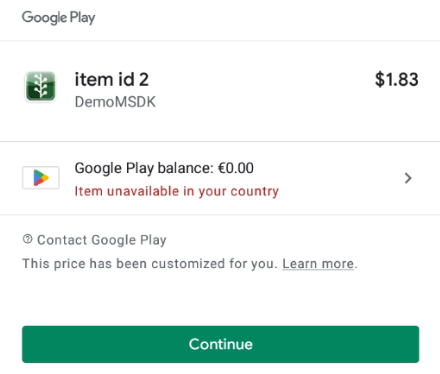
当设置为true,在Google支付的弹窗上将展示This price has been customized for you文案。为false时则会隐藏。
- Android
- Unity
- Unreal
    PaymentInfoRequestParams.Builder builder = new PaymentInfoRequestParams.Builder();
    builder.setServerId(0);
    builder.setRoleId(0);
    builder.setItemIds(itemIds);
    builder.setAppItemIds(appItemIds);
    builder.setRebateIds(rebateIds);
    builder.setLocalizeProductPrice(true or false);
    builder.setVirtualCurrencyName("Diamond");

    String virtualCurrencyName = "Diamond"; // will be displayed as the title of the purchase page

    PaymentManager.showPurchasePage(this /* activity instance */, virtualCurrencyName, builder.build(), (result, extra) -> {
        // handle purchase result
        if(result.isSuccess()) {
         TransactionInfo info = result.unwrap();
            // handle result
        } else {
         MSDKError error = result.getErrorInfo();
         // deal with error code and error message
         Logger.print(error.toString()); // this line is just an example
        }
        // handle extra info
    });
#if UNITY_ANDROID
    var paymentInfoRequestParams = new GMSDKPaymentAndroid.PaymentInfoRequestParams
    {
        serverId = _serverId,
        roleId = _roleId,
        isOfferPersonalized = true
    };
    GMSDKHandler.PaymentClient.ShowPurchasePage("Diamond", paymentInfoRequestParams, result =>
    {
        if (result.resultCode == ErrorCode.Success)
        {
            //success
        }else
        {
           //handle error
        }
    });

#endif
UMsdkPayment::ShowPurchasePage(int32 ServerId, int32 RoleId, const FString VirtualCurrencyName, bool AllItems, const FString Region = TEXT(""), int32 TopupLimit = 0);