Guest Account Binding
Overview
Some games allow users to play the game as guests, without using a platform account (Garena/Facebook/Google etc ). A user can bind his/her guest account to a platform account for better gaming experience, such as interacting with platform friends and playing the game with the same game account across devices. This doc describes the guest binding flow for such use cases.
Flow
Game side will control everything when binding a guest account to a platform account.
-
Guest binding is initiated from the game side.
-
Game side needs to ensure the destination platform account has no role in the game (has not played the game) before performing guest binding.
-
Game side checks the guest binding result, and if successful, must clear the local guest account to complete the guest bind flow.
-
User's OpenID will remain the same after a successful guest binding using the GOP Server Guest Bind API v2 /game/guest/swap.
Collaboration & Procedures
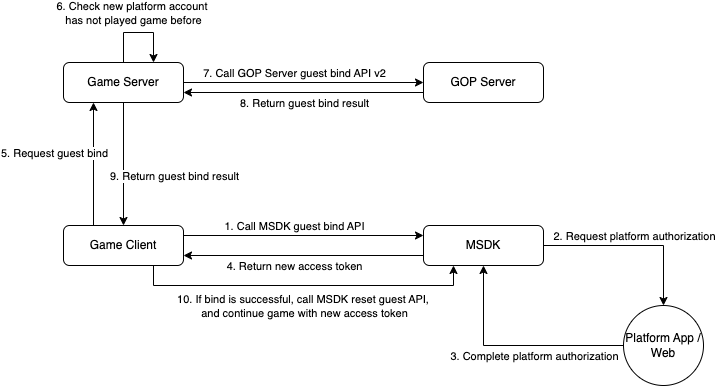
Steps:
- Game client calls MSDK guest bind API to start guest binding flow with user selected platform.
- MSDK launches the platform app/web for authorization.
- Users authorize via the platform, and MSDK obtains a new access token and OpenID.
- MSDK returns Game client the new access token and OpenID (new OpenID generated based on the platform used).
- Game client passes the new access token and openID to the game server to request guest binding.
- Game server checks that the OpenID does not have an existing game role (meaning the OpenID has never played the game before).
- Game server calls GOP server guest bind API v2 (/game/guest/swap) to request for guest binding.
- GOP processes the guest binding request, and returns the game server the result. If successful, the guest account can no longer be used for login.
- Game server returns the game client the guest binding result.
- If guest binding is successful, the game client should call MSDK API to reset the local guest account, and continue the game with the new platform access token. If guest binding is failed, the game client does not need to call MSDK API, and can just continue the game with the existing guest session.
Note: The new OpenID in step 4 is just an intermediate value to check if there's a game profile exists under the Facebook Account. This will not affect the user OpenID.
Sequence Diagram
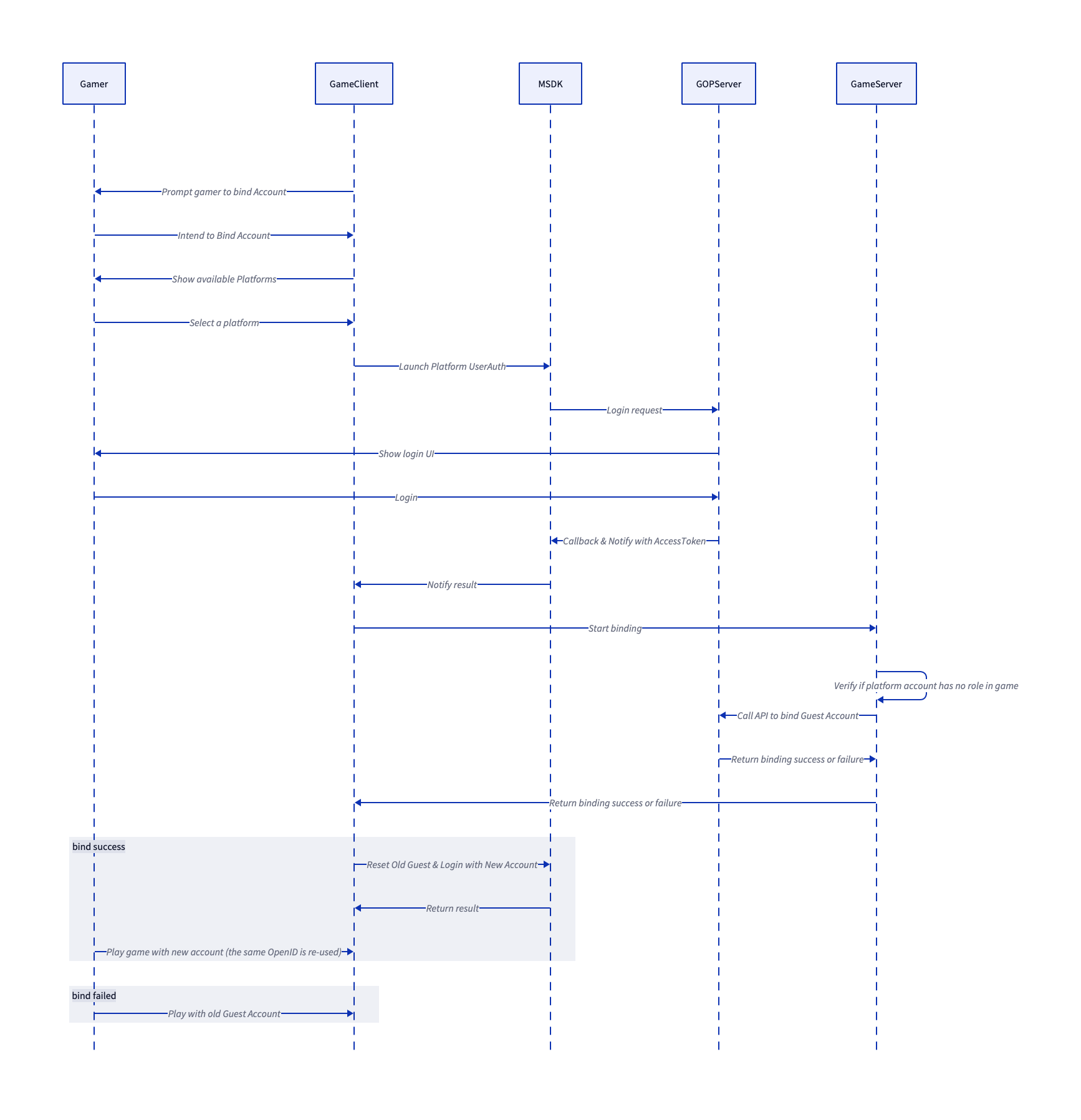
Get Binding Info
Get Binding Info API will require users to login to a platform and return the login information in the callback, this information can then be used for performing binding operation with GOP.
The following code examples show how to get the platform authentication token, which is the first step in the guest binding process.
- Android
- iOS
- Unity
- Unreal
accountManager.getGuestBindingTokenV2(platformType, callback);
// Request for a platform user auth
[MSDKLoginManager.shared getGuestBindingTokenV2ForPlatform:platform
                                         completion:^(MSDKLoginRet *loginRet) {
    NSLog(@"login result %@", loginRet);

    // Inform GOP that you wish to bind current Guest to this token with with the GOP Guest Swap API

    // The following shows the possible result of MSDKLoginRet.flag:
    // - MSDKeFlagSucc
    // - MSDKeFlagAppNotInstalled
    // - MSDKeFlagUserCancalled
    // - MSDKeFlagNetworkException
    // - MSDKeFlagUnkownError
}];
// Request platform user authentication
GMSDKHandler.BindClient.GetGuestBindingTokenV2((AccountPlatform)_guestBindingPlatform, ret =>
{
   if (ret.resultCode == ErrorCode.Success)
   {
       var platform = ret.platform;
       var openId = ret.openId;
       var token = ret.token;
       // Request game server to perform binding operation
   }
   else
   {
       Debug.LogError("GetGuestBindingToken() failed");
   }
});
MsdkCallbacks->OnGetGuestBindingTokenResult.AddDynamic(this, &<YOUR_CALLBACK_FUNCTION>);
UMsdkLogin::GetGuestBindingTokenV2(Platform);
Handle Guest Account Binding Results
After obtaining the guest binding token, you need to send it to your game server to perform the actual binding operation. The game server should call the GOP Server side API /game/guest/swap to bind the guest account to the platform account.
Once the binding operation is completed on the game server side, you need to notify the SDK about the result using the following platform-specific methods:
After the guest account binding success from the game server, you need to call
- Android
- iOS
- Unity
- Unreal
accountManager.onBindGuestSuccess();
[MSDKLoginManager.shared onGuestBindWithCompletion:^(MSDKLoginRet * _Nonnull ret) {
    if (loginRet.flag == MSDKeFlagSucc) {
        NSLog(@"The guest bind flow is completed");
    } else {
        NSLog(@"Error code: %ld", ret.flag);
    }
}];
GMSDKHandler.BindClient.OnBindGuestSuccess(ret =>
{
    if (ret.resultCode == ErrorCode.Success)
    {
        Debug.Log("Bind guest success");
        var loginToken = GMSDKHandler.LoginClient.GetLoginRecord();
        // Continue the game with the new access token
    }
    else
    {
        Debug.LogError("OnBindGuestSuccess() failed: " + ret.message);
    }

});
UMsdkLogin::OnBindGuestSuccess()
On Android only, after the guest account binding failure from the game server, you need to call
- Android
- Unity
- Unreal
accountManager.onBindGuestFailure();
GMSDKHandler.BindClient.OnBindGuestFailed();
UMsdkLogin::OnBindGuestFailure()