Platform Account Binding
Overview
Imagine that some mobile games allow players to play on both PC and Mobile. One potential problem would be:
How can we allow Google and Apple users to play that game on PC?
For PC games, so far only Garena accounts are allowed to play Garena games on PC. Hmm… what if we can combine Google / Apple and Garena accounts together to play both the PC and Mobile versions of that game.
That's it!!! That's the purpose of Platform Account Binding. It's for binding accounts of 2 different platforms together to utilize the advantages of each platform account.
Principle
Binding account B to account A on app C (Bind(A, B, C)) means creating a binding where A is the primary account and B is the secondary account on app C. After the binding happens:
- If user login using account
B, we will returnaccess tokenthat is generated from accountA - If user login using account
A, we will returnaccess tokenthat is generated from accountA
For example, Google / Apple account is the primary account, and the Garena account is the secondary account. If the user login using Google / Apple, GOP will return an access token generated from Google / Apple account. If the user login using a Garena account, GOP will return an access token generated from the Google / Apple account that is its primary account, so that we can use that access token to play that game with the same credential as the mobile one.
Of course, one primary account can have multiple secondary accounts.
To bind account B to account A on app C (Bind(A, B, C)) successfully:
Ahas to be aprimary accountof appC.Bhas to be afresh accountof appC.platform_id(B) != platform_id(A)- There is no account
D, such thatplatform_id(D) == platform_id(B)and accountDis thesecondary accountofAin appC. - App
ChasAPP_PLATFORM_BINDenabled. platform_id(B)is in the list ofsecondary_app_platform_bind_listof AppC.platform_id(A)is in the list ofprimary_app_platform_bind_listof AppC.
primary account of an app is
- an account that has grant/role on that app.
secondary account of an app is:
- not a primary account,
- connected to a primary account, there is a record on the app account binding table.
fresh account of an app is:
- not a
primary account, - not connected to any
primary accounton this app.
Flow
Collaboration & Procedures
- Assume that the user is logged in, not using guest account
- Game calls Get Platform Account Binding Info via MSDK
- GOP returns the bound accounts and the available platforms that primary account can bind.
- Game use the above data to show info to user and allow user to login with secondary account based on the platforms returned.
- MSDK helps to launch app/web for authorization.
- Game client will receive the token for secondary account.
- Game client sends primary account's token and secondary account's token to game server
- Game server calls the bind API to GOP server, and returns the binding result to game client.
Sequence Diagram
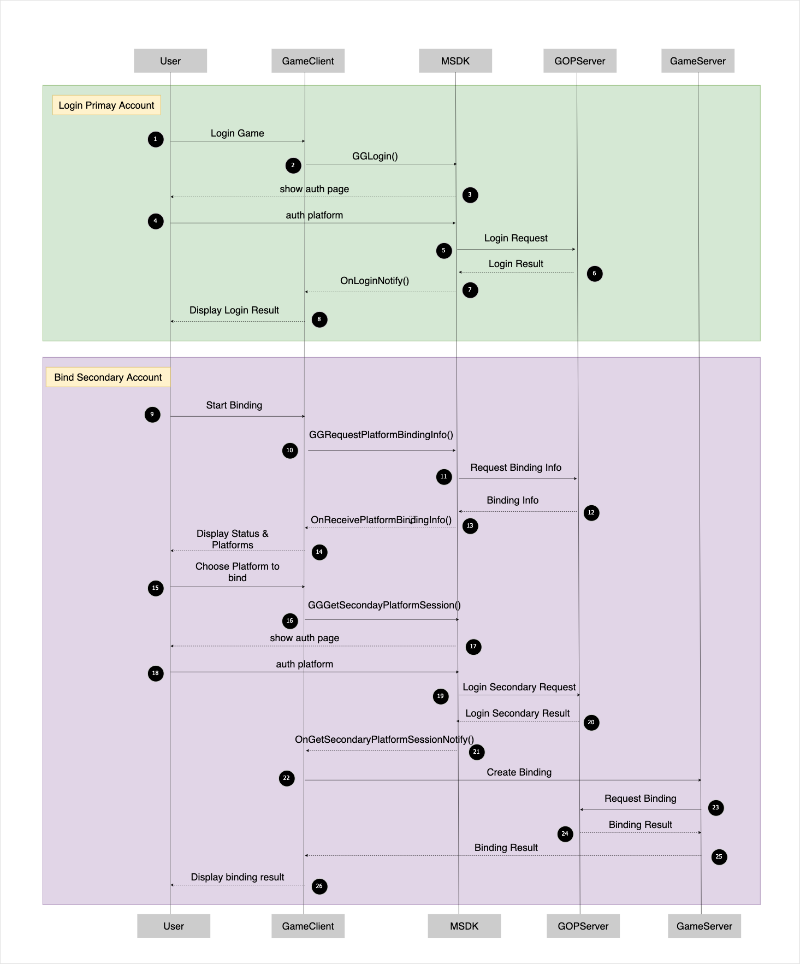
Get Binding Info
Platform Binding Status
After logging into a non-guest account, you can request the user's current platform account binding status to get both the bound accounts and available platforms to bind (which can be used to show platform options).
- Android
- iOS
- Unity
- Unreal
accountManager.getPlatformBindingInfo(new OnBindPlatformInfoListener() {

    @Override
    public void onSuccess(@NonNull List<BoundedAccount> boundedAccounts, @NonNull List<Integer> availablePlatforms) {

    }

    @Override
    public void onFailure(@NonNull MSDKError error) {

    }
});
[MSDKLoginManager.shared requestPlatformBindingInfoWithCompletion:^(MSDKPlatformBindingInfoRet *ret) {
    if (ret.flag == MSDKeFlagSucc) {
        // `ret` has all bound platform accounts and avaiable platforms to bind.
        NSLog(@"bound platform accounts: %@", ret.boundAccounts);
        NSLog(@"avaiable platforms to bind: %@", ret.availablePlatforms);
    } else {
        // failed to get platform binding info

        if (ret.flag == MSDKeFlagPlatformBindingInvalidApp) {
            // current app is not valid for platform binding
        }
    }
}];
GMSDKHandler.BindClient.GetPlatformBindingInfo(ret =>
{
 if (ret.resultCode == ErrorCode.Success)
 {
  //success
  Debug.Log("availablePlatforms = " + ret.availablePlatforms);
  Debug.Log("boundedAccounts =" + ret.boundedAccounts);
 }
 else
 {
  // handle error
  Debug.LogError("GetPlatformBindingInfo() failed: " + ret.message);
 }
});
UMsdkLogin::GetPlatformBindingInfo();
Platform Binding Token
Get platform binding token by authenticating with a non-guest secondary platform account.
- Android
- iOS
- Unity
- Unreal
accountManager.getPlatformBindingToken(platformType, callback);
[MSDKLoginManager.shared getSecondaryPlatformSessionWithPlatform:(MSDKePlatform)platform completion:^(MSDKLoginRet *loginRet) {

  if (loginRet.flag == MSDKeFlagSucc) {
        // Proceed to the next step for binding user's primary account and secondary accont. Normally, game client should send primary account's token and secondary account's token to game server

    } else {
      // Failed to get secondary platform session.

        // The possible errors:
        // MSDKeFlagNotInstall
        // MSDKeFlagUserCancel
        // MSDKeFlagNetworkError
        // MSDKeFlagAuthUserBanned
        // MSDKeFlagAuthTokenInvalid
        // MSDKeFlagError
    }
}];
GMSDKHandler.BindClient.GetPlatformBindingToken((AccountPlatform)_platformBindingPlatform, ret =>
{
 LogScene.LogResult(ret);
 if (ret.resultCode == ErrorCode.Success)
 {
  var platform = ret.platform;
  var openId = ret.openId;
  var token = ret.token;
        // Proceed to the next step for binding user's primary account and secondary accont. Normally, game client should send primary account's token and secondary account's token to game server
 }
 else
 {
        // Failed to get secondary platform session.
        // The possible errors:
        // AppNotInstalled
        // UserCancelled
        // NetworkException
        // UserBanned
        // InvalidToken
        // UnknownError
   Debug.LogError("GetPlatformBindingToken() failed: code=" + ret.Description + ",message=" + ret.message);
    }
});
UMsdkLogin::GetPlatformBindingToken(EPlatform BindPlatform);
Handle Platform Account Binding Results
On Android only, after successfully binding a platform account through your game server, you need to notify MSDK to update its local state.
- Android
- Unity
- Unreal
accountManager.onBindPlatformCompleted();
GMSDKHandler.BindClient.OnBindPlatformCompleted();
UMsdkLogin::OnAndroidBindPlatformCompleted();